Why local-first matters
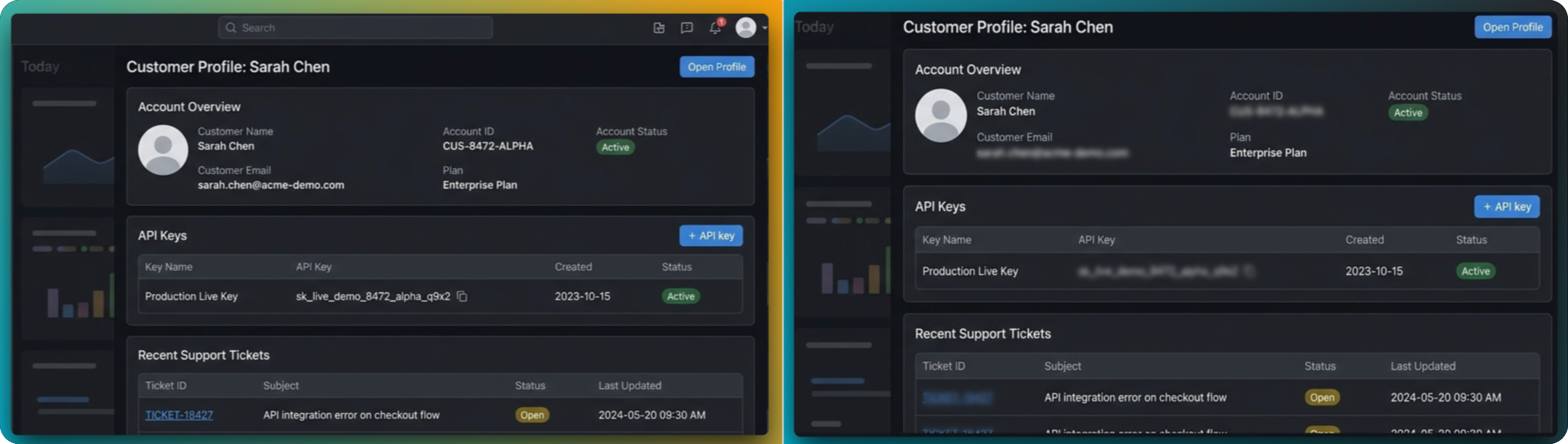
Screenshot content often includes credentials, customer details, and internal URLs. Local processing minimizes exposure by keeping edits inside your browser session.
What local-first means in FramedShot
- Image edits run in-browser rather than on remote servers.
- No account is required for core workflows.
- Screenshots are not auto-saved to your device unless exported.
- You control if and when an image is copied or downloaded.
Where this is most important
This is especially valuable for support teams, developers, and product managers working with sensitive user data, staging environments, or internal tooling.
Privacy-safe screenshot checklist
- Redact sensitive fields before any screenshot is copied or downloaded.
- Review browser chrome and peripheral UI for hidden data leaks.
- Keep raw screenshots local and export only the sanitized final image.
- Use consistent internal process for QA, support, and documentation teams.
FAQ
Does FramedShot auto-save screenshots to my device?
No. Screenshots are only saved when you explicitly choose export or copy actions.
Why does local-first matter for support and QA teams?
Those workflows often include sensitive user and internal data, so local handling reduces exposure risk.
Can local-first still look polished for launch or docs?
Yes. You still get framing, redaction, annotation, and export controls while keeping image processing in-browser.
Try the local-first screenshot workflow
Use FramedShot for browser mockups, redaction, and exports while keeping content under your control.
Install FramedShot